
🎯 Key Takeaways
- ✓ Install in 3 clicks via the Chrome Web Store + 75 free credits to test
- ✓ Four detailed use cases: single profile, Sales Nav bulk, Google search, email verifier
- ✓ 10 seconds per profile instead of 3+ minutes manually (18x faster)
- ✓ 98% deliverability thanks to a unique catch-all verification layer
- ✓ Complete comparison: Prospeo vs. Kaspr, Apollo, Lusha, Evaboot
I installed the Prospeo Chrome extension 8 months ago. Since then, I've been using it literally every day to extract LinkedIn emails. It's become my #1 prospecting tool.
Why? Because with 2 clicks, I get a verified email directly from a LinkedIn profile or Sales Navigator. No copy-paste, no switching between 3 tools, no manual verification. Just one click, and boom: email + validation status.
In this guide, I'll show you exactly how to install and use the Prospeo Chrome extension to maximize your LinkedIn prospecting. No BS, just the workflow I use daily to extract 300+ qualified emails per week.
Why the Prospeo Chrome extension is a game-changer for LinkedIn prospecting
Before Prospeo, my LinkedIn prospecting workflow looked like this:
- I found an interesting profile on LinkedIn Sales Navigator
- I copied the first name, last name, company into an Excel file
- I went to Hunter.io to search for the email
- I verified the email on NeverBounce
- I copied the validated email into my CRM
Time per contact: 3-4 minutes. For 100 contacts, that was 5-6 hours of repetitive work.
With the Prospeo Chrome extension, the same workflow takes 10 seconds:
- I'm on the LinkedIn profile
- I click on the Prospeo icon
- Verified email displayed in 2 seconds
- I add it to my list or copy it
Time per contact: 10 seconds. For 100 contacts: 15 minutes.
But it's not just about speed. It's also (and especially) about quality.
What the Prospeo Chrome extension really does
Unlike basic scrapers that throw any email address found on the web at you, Prospeo does much more sophisticated work.
Here's what happens behind the scenes when you click on the extension:
1. LinkedIn profile analysis: Prospeo retrieves public info (first name, last name, company, position)
2. Multi-source search: The tool cross-references multiple databases to find the email associated with this profile
3. Email pattern detection: Prospeo identifies the email format used by the company (firstname.lastname@, flastname@, etc.)
4. Real-time verification: Each email found is instantly verified through:
- SMTP check (mail server connection)
- MX record verification (valid mail server)
- Catch-all detection (emails that accept everything)
- Real deliverability test
5. Result display: The email + its status (valid, catch-all, invalid) appears in the extension
Result: 98% guaranteed deliverability.
On my 5,000+ emails extracted with Prospeo, my average bounce rate is 1.8%. That's impressive.
👉 Read my complete Prospeo 2025 review after 8 months of intensive use
Installing the Prospeo Chrome extension (5 minutes flat)
The installation is super simple. Here's the exact process.
Step 1: Create a Prospeo account (free)
Before installing the extension, you need to create a Prospeo account.
Process:
1. Go to prospeo.io
2. Click on "Start Free Trial"
3. Enter your professional email (no personal Gmail/Outlook)
4. Create your password
5. Confirm your email via the link received
Important: The free plan gives you 75 credits/month. No credit card needed. It's really free.
What you can do with 75 credits:
- 75 emails found and verified, OR
- 150 emails verified (if you already have the emails), OR
- 7 B2B mobiles found (10 credits per mobile)
For testing, that's more than enough.
Step 2: Install the extension from the Chrome Web Store
Once your account is created and confirmed:
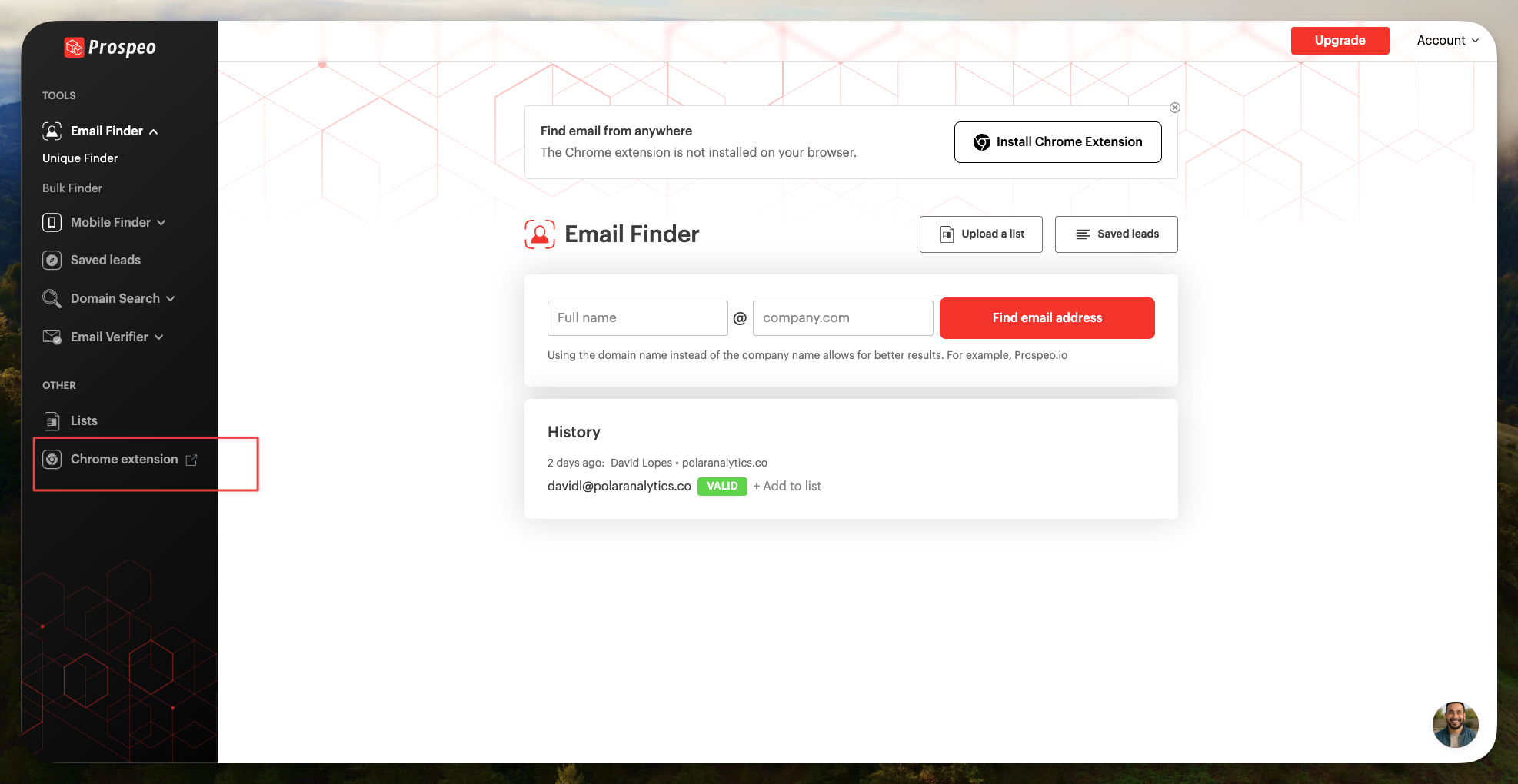
1. Click on the left sidebar "Chrome extension"

2. You land on the extension's Google Chrome page
3. Click on "Add to Chrome"

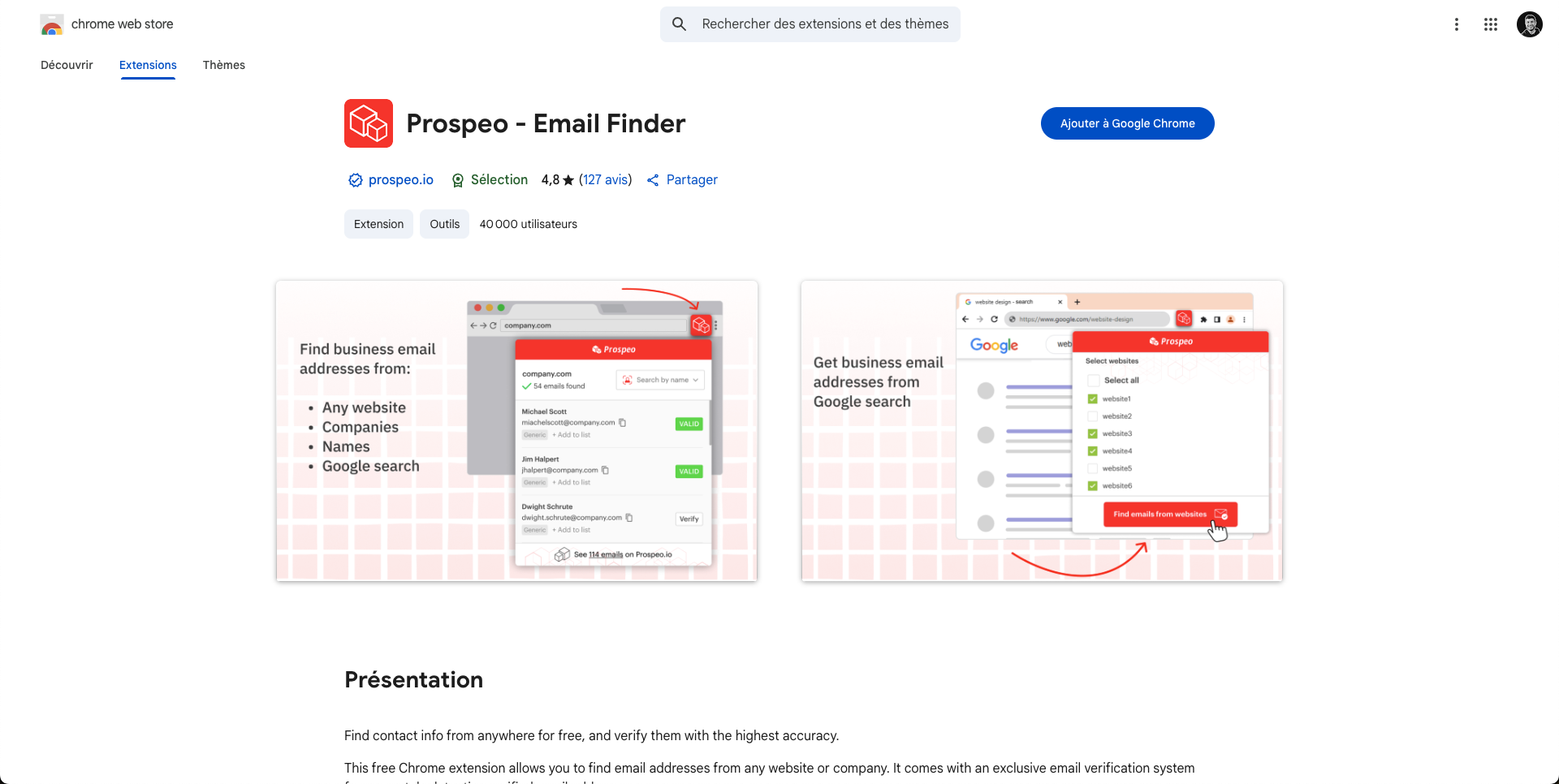
4. Confirm the installation by clicking "Add extension"
Permissions requested by the extension:
- Access to browser tabs (to analyze LinkedIn profiles)
- Access to data on sites you visit (to extract info)
This is normal, all scraping extensions request these permissions.
Installation time: 30 seconds.
Step 3: Connect the extension to your Prospeo account
Once the extension is installed, you'll see the Prospeo icon at the top right of your Chrome navigation bar (next to other extensions).
Connection process:
1. Click on the Prospeo icon
2. A popup opens asking you to log in
3. Enter your Prospeo email and password
4. Click on "Login"
Boom, you're connected.
You'll see your remaining credits displayed in the extension. On the free plan, you have 75 credits.
Step 4: (Optional) Install the extension on Firefox
Prospeo also offers a Firefox extension if you don't use Chrome.
Identical process:
1. Go to Firefox Add-ons
2. Search for "Prospeo"
3. Click on "Add to Firefox"
4. Log in with your account
Personally, I use Chrome because it's more stable for LinkedIn Sales Navigator.
How to use the Prospeo Chrome extension: 4 concrete use cases
Now that the extension is installed, here's how I use it daily.
Use case 1: Extract email from an individual LinkedIn profile
Context: You've identified a specific prospect on LinkedIn and you want their email.
Process:
1. Open the prospect's LinkedIn profile
- Via a classic LinkedIn search
- Via a Sales Navigator search
- Via a recommendation
2. Click on the Prospeo icon at the top right of your browser
3. The extension analyzes the profile
- Takes 2-3 seconds
- You see a small loader
4. The result appears in the Prospeo popup:
- Email found: [email protected]
- Status: Valid (in green)
- Sometimes the B2B mobile (if available)

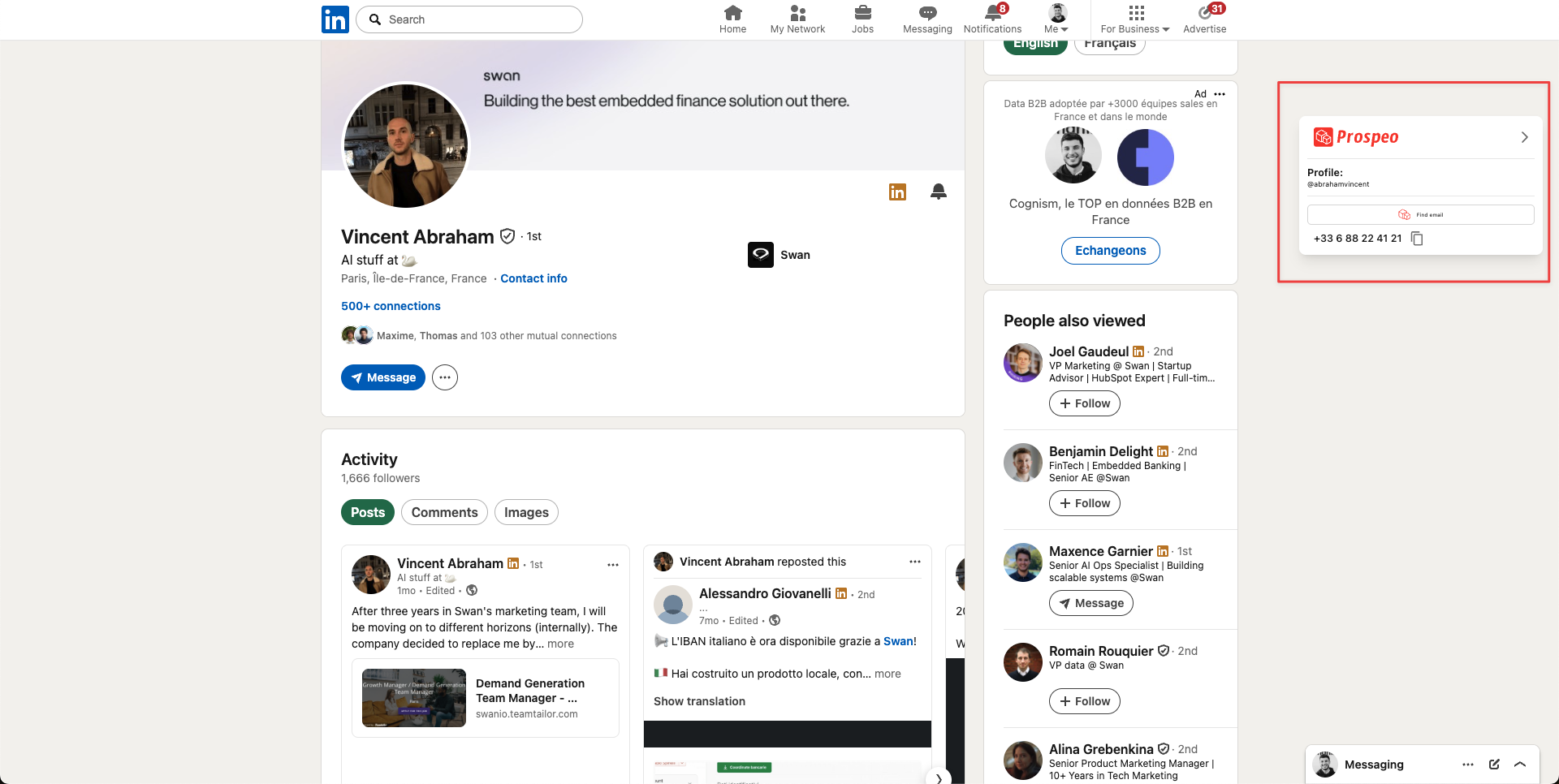
5. You can:
- Copy the email (copy icon)
- Add it to a list (add to list icon)
- See verification details (info icon)
Cost: 1 credit per email found and valid.
If the email is not found: You'll see "No email found" and you won't be charged.
If the email is catch-all: You'll see "Catch-all" with an orange status. You won't be charged either.
My usage: I do this 10-15 times a day to enrich my prospects identified on Sales Navigator. Success rate: about 70%.
Use case 2: Extract emails from a Sales Navigator list (Bulk)
Context: You have a Sales Navigator search with 500+ results and you want to extract all emails at once.
Prerequisite: Have an active LinkedIn Sales Navigator subscription.
Process:
1. Configure your Sales Navigator search
- Define your filters (title, company, location, etc.)
- Launch the search
2. On the results page, click on the Prospeo icon
3. Select "Extract from Sales Navigator"
4. Configure extraction options:
- Number of profiles: How many profiles you want to extract (max 2500 per search)
- Skip duplicates: Check this option to avoid re-extracting already processed profiles
- Extract mobile: Check only if you want mobiles (costs 10 credits per mobile found)
5. Click on "Start extraction"
6. Prospeo does the job
- Extraction runs in the background
- You can close the popup, it continues
- Time: about 5 minutes for 500 profiles
7. Download the CSV
- Once finished, click on "Download CSV"
- You get a file with all profiles + emails
Exported CSV columns:
- First name, Last name
- Job title
- Company name
- LinkedIn URL
- Email address
- Email status (valid, catch-all, invalid)
- Location
- Company size
- Industry
- (Mobile if requested)
My post-extraction workflow:
1. I open the CSV in Google Sheets
2. I filter on "valid" only (I remove catch-all and invalid)
3. I import into Lemlist for my cold emailing sequence
4. I launch my campaign
Results on my last extraction of 700 profiles:
- 463 emails found (66%)
- 441 valid emails (95%)
- 22 catch-all removed
- Cost: 463 credits
- Total time: 7 minutes
- Campaign bounce rate: 1.9%
Use case 3: Enrich profiles from Google Search or any website
Context: You're on Google, searching for "CMO SaaS France", and you find interesting profiles.
What's amazing with Prospeo: The extension doesn't only work on LinkedIn. It works on any website.
Process:
1. You're on a website (company "About Us" page, blog article with author bio, etc.)
2. You see a person's name + their company
3. You click on the Prospeo icon
4. You manually fill in:
- First name
- Last name
- Company domain
5. Prospeo finds and verifies the email
Real use cases where I use this:
- Blog articles with interesting authors
- "Team" pages of target company websites
- Conference/webinar speakers
- Google results on targeted queries
Concrete example:
I was looking for Heads of Sales in French scale-ups. I did a Google search: "Head of Sales SaaS France". I found an article listing the "Top 10 Sales Leaders in France".
For each name in the article:
1. I clicked on Prospeo
2. I entered the name + the mentioned company
3. I got the email
Out of 10 names, I found 7 valid emails. Total time: 5 minutes.
Use case 4: Verify emails you already have (Email Verifier)
Context: You have a list of emails (old Excel file, event, webinar) and you want to verify they're still valid.
Process:
1. Click on the Prospeo icon
2. Select "Email Verifier"
3. Paste your email (or upload a CSV if you have several)
4. Prospeo verifies in real time:
- Valid: OK, you can send
- Catch-all: Risky, use with caution
- Invalid: Remove it from your list
Cost: 0.5 credit per email verified (half price vs finding an email)
My usage:
Before each cold emailing campaign, I run my entire list through Prospeo's Email Verifier. It costs me 50 credits to verify 100 emails, but it guarantees me a bounce rate <2%.
It's an investment that protects my sender reputation. Once you're blacklisted by Gmail/Outlook, it's a mess for weeks.
Advanced features of the Prospeo Chrome extension
Beyond basic use cases, the extension has some advanced features I use regularly.
1. The lists system (Lead Lists)
You can create lists directly from the extension to organize your prospects.
How it works:
1. When you extract an email, click on "Add to list"
2. Create a new list (e.g., "Q1 2025 Prospects")
3. Add the contact
Advantage: You find all your lists in your Prospeo dashboard. You can then export each list to CSV.
My usage: I create one list per campaign. Example: "HR SaaS Campaign", "FinTech Campaign", etc. It allows me to segment properly.
2. Extraction history (Search History)
Prospeo keeps a history of all your extractions. Useful for finding a profile you extracted 2 weeks ago.
Where to find it: In your Prospeo dashboard > "Search History"
What's stored:
- Extracted LinkedIn profile
- Email found
- Extraction date
- Email status
Limit: 30 days retention (on free and Starter plan).
3. The integrated Mobile Finder
When you extract an email from a LinkedIn profile, Prospeo also offers to find the person's B2B mobile.
Process:
1. On the LinkedIn profile, click on Prospeo
2. The email appears
3. Below, you see "Find mobile" (with "10 credits")
4. Click on it if you want the mobile
Cost: 10 credits per mobile found.
Success rate: About 25-30% according to my tests.
My advice: Don't do it systematically (too expensive). Do it only for your top prospects or for your cold calling campaigns.
4. Direct export to your CRM
Prospeo integrates with several CRMs via Zapier or Make.
Supported CRMs:
- Salesforce
- HubSpot
- Pipedrive
- Monday.com
How it works:
1. Set up a Zap: "New contact added to Prospeo list" → "Create contact in Salesforce"
2. Every time you add a contact to a Prospeo list, it's auto-created in your CRM
My setup: I use Make to connect Prospeo → Google Sheets → Lemlist. Each extracted contact is auto-imported into my cold emailing sequence.
The limitations of the Prospeo Chrome extension (let's be honest)
After 8 months of use, here are the limitations I've identified.
Limitation 1: Doesn't find 100% of emails
Average success rate: 60-70%. It's very good, but it's not magic.
Why?
- Some profiles don't have a findable public email
- Some companies block access to their emails
- Some LinkedIn profiles are incomplete
My solution: I combine Prospeo with FullEnrich (waterfall enrichment) to maximize coverage.
Limitation 2: 2500 profile limit on Sales Navigator
If your Sales Navigator search has more than 2500 results, Prospeo can only extract the first 2500.
Solution: Segment your search into several batches (by region, by company size, etc.).
Limitation 3: Requires LinkedIn Sales Navigator for bulk extraction
To extract in bulk from Sales Navigator, you must have a Sales Nav subscription (starting at $99/month).
If you only have a free LinkedIn account, you can only extract profile by profile (which is still good).
Limitation 4: Doesn't work with LinkedIn Recruiter
The extension only works with classic LinkedIn and Sales Navigator. If you use LinkedIn Recruiter, it doesn't work.
Alternatives: Evaboot or Phantombuster support Recruiter.
Limitation 5: Mobiles are expensive in credits
10 credits per mobile found is expensive. If you extract 500 profiles and want all the mobiles, it potentially costs you 5000 credits (vs 500 for emails alone).
My advice: First extract emails, filter the most qualified prospects, then launch a targeted extraction for mobiles only on your top 20%.
Pro tips to maximize your use of the Prospeo extension
Here are my tips after 8 months of intensive use.
Tip 1: Always activate "Skip duplicates"
In Sales Navigator extraction settings, always check the option "Skip leads you already extracted".
Otherwise, you risk paying twice for the same profiles if you redo a similar search.
Tip 2: Filter on "valid" only after extraction
After downloading your CSV, open it in Google Sheets and filter on the "email_status" = "valid" column.
Remove the "catch-all" and "invalid". Yes, you lose some prospects, but you protect your sender reputation.
Tip 3: Combine the extension with the web Email Finder
If the extension doesn't find the email from the LinkedIn profile, try the Email Finder in your Prospeo dashboard (with first name + last name + company domain).
Sometimes, the tool finds it via another source.
👉 Discover how to find LinkedIn emails with Prospeo
Tip 4: Use lists to segment
Create one list per campaign or per ICP. It allows you to keep your extractions organized and reuse lists later.
Tip 5: Always verify before sending a campaign
Even with 98% deliverability, always run your final list through the Email Verifier before sending your campaign.
Cost: 0.5 credit per email. It costs you 50 credits to verify 100 emails, but it guarantees you a bounce rate <2%.
Tip 6: Optimize your plan according to your usage
- If you do <100 contacts/month: Stay on the free plan (75 credits)
- If you do 300-500 contacts/month: Take the Starter (1000 credits / $39/month)
- If you do 1000-3000 contacts/month: Take the Growth (5000 credits / $99/month) - that's my current plan
- If you do >5000 contacts/month: Take the Pro or Business
How much does the Prospeo Chrome extension really cost?
The extension itself is free. You only pay for credits consumed via your Prospeo plan.
Plans reminder:
| Plan | Credits/month | Price/month | Cost per email |
|------|--------------|-----------|----------------|
| Free | 75 | $0 | $0 |
| Starter | 1,000 | $39 | $0.039 |
| Growth | 5,000 | $99 | $0.02 |
| Pro | 20,000 | $199 | $0.01 |
| Business | 50,000 | $369 | $0.007 |
My economic calculation:
Before Prospeo, I was paying:
- Hunter.io: $49/month (for 1000 emails)
- NeverBounce: $30/month (for verification)
- Total: $79/month
With Prospeo Growth ($99/month), I have:
- Email Finder + Email Verifier + Mobile Finder in one tool
- 5000 credits (vs 1000 with Hunter)
- Better deliverability (98% vs 92% with Hunter)
Gain: +$20/month in cost, but x5 in volume and better quality.
The ROI is obvious.
Prospeo Chrome extension vs alternatives
I've tested the main competing extensions. Here's my honest comparison.
Prospeo vs Kaspr
- Kaspr: Very good for mobiles, less good for emails
- Prospeo: Better email validity rate, more expensive mobiles
My verdict: Prospeo for email quality, Kaspr if you absolutely want mobiles at any price.
Prospeo vs Apollo Chrome Extension
- Apollo: Free extension but requires an Apollo account (with 500 credits/month limit on free plan)
- Prospeo: 75 free credits, then paid according to plan
My verdict: Apollo if you want an all-in-one tool (CRM + sequences), Prospeo if you just want to enrich your lists with the best quality.
Prospeo vs Lusha Extension
- Lusha: Similar extension, but more expensive ($39/month for 500 credits vs 1000 for Prospeo)
- Prospeo: Better value for money
My verdict: Both are good quality-wise, Prospeo wins on price.
Prospeo vs Evaboot
- Evaboot: Specialized Sales Navigator export, no email verification
- Prospeo: Export + integrated verification
My verdict: Evaboot for pure scraping (no 2500 profile limit), Prospeo for quality and verification.
My final verdict: Is the Prospeo Chrome extension worth it?
After 8 months of daily use and 5000+ emails extracted, here's my honest opinion:
The Prospeo Chrome extension is the best tool I've tested for enriching my LinkedIn prospects. The native integration with LinkedIn and Sales Navigator, real-time verification, and 98% deliverability rate make it an indispensable tool for anyone doing serious B2B prospecting.
You should install the Prospeo extension if:
- You do B2B prospecting on LinkedIn regularly
- You want to save time (vs manual search)
- Data quality is your priority (vs quantity)
- You have a reasonable budget (from $39/month)
You can skip it if:
- You do less than 50 contacts per month (Apollo's free plan is enough)
- You want an all-in-one tool with CRM (take Apollo)
- You don't use LinkedIn for your prospecting
My personal usage:
I'm on the Growth plan ($99/month). I use the extension 4-5 times a week to enrich my Sales Navigator searches. I get about 1200 valid emails per month, which feed all my cold emailing campaigns.
The ROI is massive: a single deal signed via my campaigns (average ticket: €3000) pays back 30 times my Prospeo subscription.
If you do B2B outbound, this extension is a no-brainer.