🎯 Key Takeaways
- ✓ Waterfall enrichment boosts results by 30%—use Skrapp, VoilaNorbert, FullEnrich, Prospeo and Icypeas, always verify addresses and start with free plans
Tired of struggling to find that golden prospect's email address? Is your CRM turning into a lead graveyard while you have tons of follow-ups to send?
This guide is your key to unlocking all legal methods, from the ultra-simple email pattern (examples included) to waterfall enrichment that rocks – tools like Hunter, Skrapp.io, FullEnrich, Prospeo or Icypeas (with free plans) + a pro strategy to boost your success rate by 30%.
Ready to transform your search into a B2B war machine? This changes everything, promise.
Struggling to find an email address? Here's the ultimate (and legal!) guide
Tired of going in circles without finding that prospect's email address who was slipping through your fingers? We get it. A lead graveyard in your CRM isn't exactly what you call "effective prospecting," right?
The good news? Tools and methods to find professional emails exist, even for beginners. We're not talking about hacking NASA, but legal techniques that rock: automated search with tools like Hunter, Skrapp.io, FullEnrich, Prospeo or Icypeas, deduction by standard models, extraction from websites... Not to mention manual tricks that hit the mark when robots fail.
We reveal everything: manual methods that still work, tools that do the work for you, and even the pros' secret strategy for a success rate that explodes the counters. Spoiler: it's not magic, but almost.
Ready to transform your email search into a piece of cake? Let's go!
Manual techniques to play detective (and it's free!)
Guess the email like a pro with the "pattern" technique
Want to find a professional address without breaking the bank? Play detective with the pattern! Knowing the name and domain, you can try combinations. It's a real deduction game!
- [email protected] (the classic for big companies)
- [email protected] (shortened version for long first names)
- [email protected] (simple but often taken)
- [email protected] (for the discreet)
- [email protected] (ex: john_d@ to avoid duplicates)
- [email protected] (when founders want to stay accessible)
Pro tip: test several variants like a real code-breaker. Sometimes, it's as effective as a well-played lottery! And if it gets stuck, don't forget numbers (like john1@) or underscores (john_smith@) - companies sometimes use them.
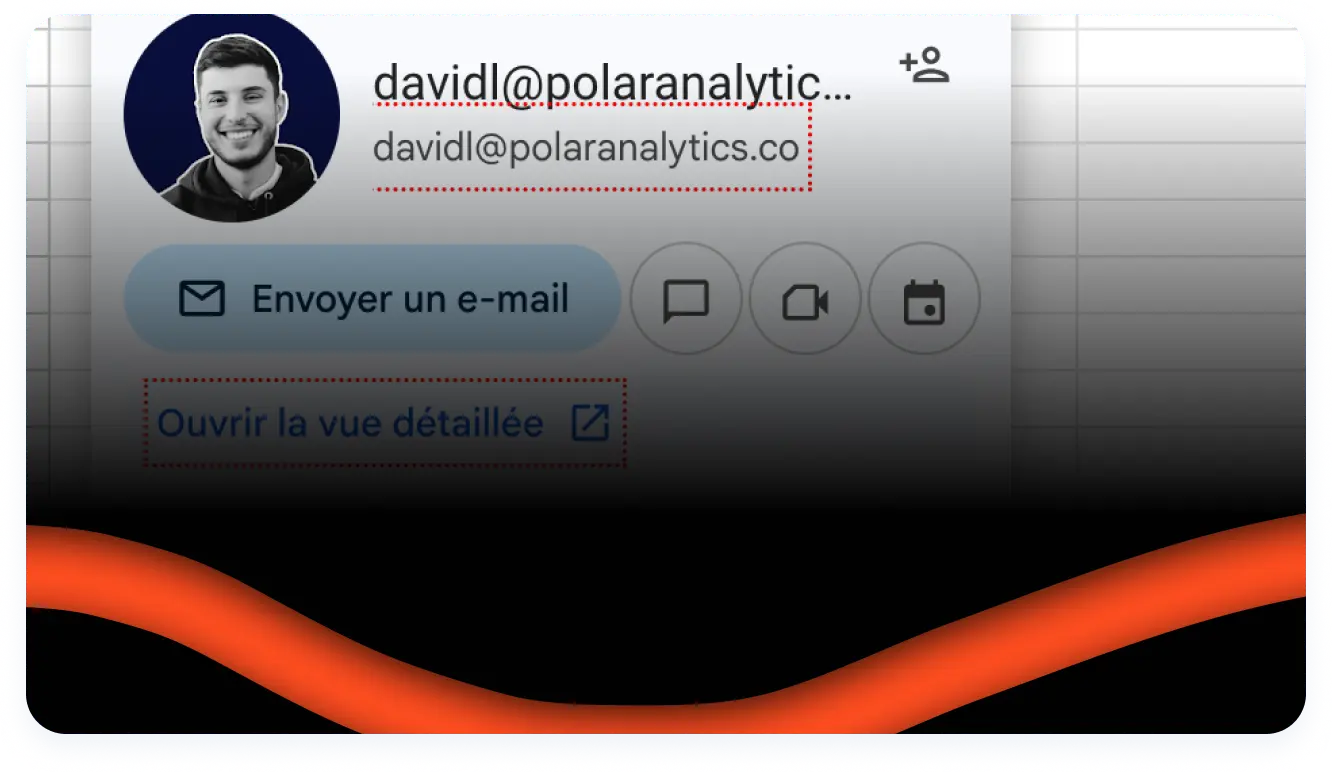
The Google Sheet hack that rocks: You can test your emails directly in Google Sheet! Turn your cell into a "smart chip" (Data menu > Smart chips) and by hovering over it, Google tells you if it's a valid contact or not. It doesn't work every time, but when it does, it's free and ultra-fast. Perfect for validating a few addresses without burning your paid tool credits!
src="/attached_assets/david-lopes-article-trouver-un-email-googlesheet.webp" srcSet="/attached_assets/david-lopes-article-trouver-un-email-googlesheet-700w.webp 700w, /attached_assets/david-lopes-article-trouver-un-email-googlesheet-1000w.webp 1000w, /attached_assets/david-lopes-article-trouver-un-email-googlesheet.webp 1752w" sizes="(max-width: 768px) 100vw, 665px" alt="Email validation in Google Sheet with smart chip" loading="lazy" width="1752" height="1608" className="rounded-lg shadow-lg my-6" /> src="/attached_assets/david-lopes-trouver-un-email-chips-intelligent.webp" srcSet="/attached_assets/david-lopes-trouver-un-email-chips-intelligent-700w.webp 700w, /attached_assets/david-lopes-trouver-un-email-chips-intelligent-1000w.webp 1000w, /attached_assets/david-lopes-trouver-un-email-chips-intelligent.webp 1014w" sizes="(max-width: 768px) 100vw, 665px" alt="Smart chip menu in Google Sheet to verify emails" loading="lazy" width="1014" height="762" className="rounded-lg shadow-lg my-6" /> Google is much more than a cooking tool! Use these explosive queries to find emails hidden in the corners of the web. It's like rummaging through the drawers of a giant library. Test these formulas: site:companyname.com "firstname lastname" email or "firstname lastname" + "company name" + contact. These methods take you to emails published on sites, blogs or press releases. Smart pro tip: combine intitle:"contact" OR intitle:"team" site:company.com to find pages dedicated to teams. And for productivity addicts, filetype:pdf "resume firstname lastname" site:company.com can reveal internal CVs with emails. Warning: you have to persevere, but sometimes it explodes the counters! LinkedIn is the dream hideout for headhunters! Go to the target profile, check "Contact info" - sometimes the email shines in the dark. But if it's completely empty, don't panic: name + company = basic combo for other techniques. Also look in "About" and "Experience" - some drop their contact info like "contact me at [email protected]". And for real pros, exporting 1st degree connections (via Settings > Get a copy of your data) can hide shared addresses. Personally, I say: LinkedIn is the B2B prospecting treasure, but you have to dig, respect privacy and avoid spamming once the email is found! src="/attached_assets/david-lopes-trouver-un-email-via-linkedin.webp" srcSet="/attached_assets/david-lopes-trouver-un-email-via-linkedin-700w.webp 700w, /attached_assets/david-lopes-trouver-un-email-via-linkedin-1000w.webp 1000w, /attached_assets/david-lopes-trouver-un-email-via-linkedin.webp 1902w" sizes="(max-width: 768px) 100vw, 665px" alt="How to find an email via LinkedIn in profile contact info" loading="lazy" width="1902" height="1192" className="rounded-lg shadow-lg my-6" /> Imagine a tool that finds you a professional email in 2 seconds flat. That's the magic of "email finders"! These SaaS hook you up to giant public email databases (Hunter.io processes 107 million) and use algorithms to predict the address like "[email protected]". The process? First, the tool searches its data. If nothing, it tests all possible combinations by checking the server response live. And the cherry on top: each address is systematically tested before being delivered to you. No "bounce" or "mailbox full" surprise! Some even push verification by analyzing DNS records to avoid dead domains. Result? A clean list and a solid sender reputation. Modern prospecting means ultra-efficient tools. Here's the winning combo to rock without breaking the bank: | Tool | Ideal for... | Free Plan | Success Rate | |-------|--------------|--------------|------------------| | Hunter.io | Domain name search | 25-50 credits/month | Reputable, no official figure | | Skrapp.io | LinkedIn integration | 50 searches/month | 92% success | | Voila Norbert | Simplicity and high precision | 50 verified emails/month | Up to 98% success | | FullEnrich | Automated waterfall enrichment | 50 free credits | 80%+ with less than 1% bounces | | Prospeo | Massive extraction from LinkedIn | 75 credits/month | Solid, no official figure | | Evaboot | Clean Sales Navigator scraping | 7-day trial | Clean and GDPR compliant | | ContactOut | Ultra-fast Chrome extension | 40 emails/month | Fast and efficient | Voila Norbert is the Swiss army knife for clean freaks. In free mode, you get 50 verified emails ("Valid" or "Invalid" status + confidence score). Perfect for "cold emailing" without headaches. The tool even gives you the exact email status ("Catch-All", "Unknown") so you avoid false positives. Skrapp.io is your LinkedIn ally. You surf on a profile and bam! The Chrome extension gives you the email in one click. You can even send CSV lists for bulk searches. 92% success, that's heavy! The Sales Navigator extension allows you to retrieve email + social networks + exact position of a prospect. For recruiters, it's the winning combo. Hunter.io, the ancestor that still rocks. Its database of 107 million B2B emails allows domain searches (like "Microsoft salespeople"). The free plan gives you 25-50 credits/month. Its extra thing? The "Signals" extension to spot hot prospects via their online activity. You see who's interested in your content and take action at the right time. FullEnrich is waterfall in automatic mode. You send your prospect list, and the tool tests 15+ data providers in cascade to get you the email AND phone. Result? 80%+ success rate with less than 1% bounces. The free trial of 50 credits allows you to test without pulling out the credit card. Starting at $29/month, it's clearly the value for money that rocks for waterfall without headaches. Prospeo is your ally for massive extraction. Whether via LinkedIn, Sales Navigator or even CSV lists, Prospeo gets you emails in a few clicks. The free plan of 75 credits/month is perfect for testing. Its extra thing? Integrated verification and direct export to your CRM. For Growth Managers who want to scale, it's solid. Evaboot, the LinkedIn Sales Navigator scraping specialist. If you're already on Sales Nav, Evaboot allows you to extract clean lists (name, email, phone, position, company) while respecting GDPR. The 7-day trial gives you 200 credits to test. After, it's $49/month. The crazy thing? The tool automatically cleans your data and formats everything for your email sequences. It's plug & play! ContactOut is pure speed. Chrome extension that displays email + phone in one click on LinkedIn. 40 free emails/month, perfect for cherry-picking your hottest prospects. For recruiters and Sales who want ultra-personalized one-to-one, it's the tool you need. No frills, just efficiency. And GDPR in all this? The tools are 100% compliant. No scraping of personal profiles or hacked emails. Just public data and ethical algorithms. No stress, your list is compliant. Plus, duplicates don't cost you credits and bad emails (invalid, disposable) are systematically filtered. You build your database with peace of mind! Wondering why your success rate for finding emails remains low? Shocking revelation: no tool is perfect. Each platform has its own database, often incomplete. Using a single email finder is like looking for keys under a streetlight when the real light comes from elsewhere. The stats speak for themselves: staying on a single provider, you miss out on 30% of additional contacts. It's not a detail, it's huge! Each tool has its geographic or sector specialty – why deprive yourself? Here's the pros' secret: "waterfall enrichment". The idea? Test a contact on tool A, then B, then C... until you find a valid address. It's like knocking on several doors to find the right key. This method boosts your success rate by 30%. Impressive, right? Specialized platforms, as we can see in this complete FullEnrich test, have automated this process. You upload your prospect list, and the tool does the work for you. FullEnrich, for example, boasts a success rate of 80%+ for emails, with a bounce rate below 1%. It's the winning combo to transform your CRM into a real contact treasure. And the cherry on top: cascade verifications avoid rotten addresses. FullEnrich uses three different validation tools, guaranteeing that each sent email lands in the inbox, not in the void. Result? Less hassle, more appointments. With a free trial of 50 credits and plans starting at $29/month, you have no more excuses. It's not just smart, it's essential. Send an email to a rotten address and there... it's game over for your sender reputation! "Hard bounces" (permanently rejected emails) inflame your deliverability metric. Beyond 2% bounces, ISPs like Gmail or Outlook slap you with the "suspect" label. Worse? You're blacklisted, your domain ends up in spam, and even your regular recipients receive nothing anymore. It's total failure! And it's not just an alert: it's a complete crash of your stats. Emails going into the void = costs skyrocketing, rigged campaigns, and your ROI plummeting. Not to mention spam traps: those dead addresses that officially declare you "enemy". One misstep and you're burned for months. Are you ready to take this risk? Verification tools throw you statuses that look like geek jargon? Here's the plain translation: - Valid: The address exists, it's 100% clean. Send, it's heavy - Invalid: The email doesn't exist. Delete it directly, it's a time bomb - Catch-All: The domain accepts everything you throw at it, but the specific address? No idea. It's the equivalent of a blind shot - Unknown: The tool couldn't decide. Put it in the "handle with care" category The pros at Skrapp, Voila Norbert, Neverbounce or Icypeas explain that a "Catch-All" status often hides a trap: the email is accepted, but it might land in a dead mailbox. Skrapp claims 92% accuracy, Voila Norbert up to 98%... but even they warn: beware of Catch-All. Neverbounce is THE bulk verification specialist. You send your list, and the tool returns the status of each address (valid, invalid, catch-all, unknown) in minutes. Perfect for cleaning your CRM before a massive campaign. Plans starting at $0.008/email, it's insurance for top deliverability. Icypeas is the enrichment + verification combo. The tool finds you the email AND verifies it in one workflow. With its integrated waterfall and advanced validation features, Icypeas guarantees ultra-clean lists. Your click rate could collapse if you skip verification, and your domain name could get blacklisted. It's total failure! Let's be clear, you're wondering if you can find JaneDoe92's personal email via her social profiles? Spoiler: it's mission nearly impossible. Facebook, Instagram and TikTok lock down their personal data. No "crazy trick" to expect here. Why do people struggle? Social networks NEVER release this data without agreement. Even a "contact: [email protected]" in bio is 99% professional. For personal, it's no way. And trying to pump them in brute force? You immediately put yourself against GDPR. These platforms block any automatic extraction, making scraping illegal. GDPR, you know it? This European regulation that requires you to respect privacy. Even if emails are public, without clear consent, it's forbidden. Possible sanctions: 20 million euros or 4% of global revenue. Do you really want this risk? The "professional" vs "personal" boundary is clear. [email protected]? Free to search for it in B2B with tools like Hunter, Skrapp.io, FullEnrich, Prospeo, Evaboot, ContactOut, Icypeas or Neverbounce (all GDPR compliant), as long as it's clean. But [email protected]? Stop. Privacy theft guaranteed. Personal scraping tools? To avoid. Platforms will blacklist you, your bounce rate will explode. In summary: personal email, it's game over on social networks. If you want to prospect, stay in B2B with legal tools. Legality is 100% non-negotiable. Contacting without consent means putting yourself against not only the law, but also your reputation. So, calm down and stay clean! You've tested everything, but the email address resists? Breathe! There's always a solution to not stay blocked. Sometimes, it's just a matter of method! Check the name spelling An extra "S" or a missing "é", and it's drama! Double-check the first/last name on LinkedIn or the company website. Even colleagues make mistakes in their CV! Is the person still in position? Let's be honest, LinkedIn isn't always up to date. A look at their professional profile will tell you if they're at ACME or Google. "Open to work" statuses are often reliable indicators. Is the domain name correct? You typed @acme.com, but it might be @acme-group.com? Some companies use different domains. A tour on the official website or email signatures can change everything! If it doesn't work, change approach. Try instead: - A direct message on LinkedIn to target the right person. - The company contact form for a legal approach. - The phone switchboard to verify if the person is still in position. Sometimes, it's just a matter of timing. But respecting privacy remains crucial. Otherwise, you cross over to the dark side of marketing... You now have all the cards in hand: manual methods to start, automated tools to save time, classic combinations to boost your chances, and above all, you know how to stay within GDPR rules. This is heavy! Finding the email is good. But the hottest thing is what you'll do with it after. A bad message can ruin all this work. And the stats are clear: only 1 in 12 prospects respond on average to a prospecting email. But with a personalized approach and a custom offer, this rate skyrockets! So, no excuses: take action, test these techniques, and transform your prospecting! And if you want even more strategies to rock, check out our other guides and tutorials. That's where everything changes! You'll find email templates that rock, tricks to avoid spam, and even how to chain follow-ups without annoying anyone. Ready to go into overdrive? Let's go! You have all the keys to find any professional address! Manual techniques, email finders and waterfall strategy: transform your lead graveyard into a prospect pool. Verify your emails, stay GDPR-compliant and launch! For more strategies, check our guides.Google is your best friend: search operators that change everything
LinkedIn, the gold mine (sometimes hidden) for professional contacts
"Email finders": the magic tools to find an email address
What is an "email finder" and how does it work?
Top tools to find emails (with free plans!)
The advanced strategy that rocks: "waterfall enrichment"
Why settling for one tool means missing the holy grail
The "pro tip": chain tools for a massive result
The crucial step: verify your emails to avoid "game over"
An unverified email is a direct red card
"Valid", "catch-all", "invalid": decoding the jargon
The killer question: what about personal emails on facebook, insta or tiktok?
Email still not found? Don't panic, here's plan B
So, ready to find any email address?